 |
CMMTree v1.0
|
|
CMMTree v1.0
|
The CMMTree is a tool designed to track and analyze the relationships that exist between the studied data.
It is a software package designed to build multiway trees, in which the structure of connections between data can be freely modeled using an arbitrarily defined predicate that specifies the conditions for connecting nodes.
The software is designed to be able to provide custom rules for connecting nodes without any interference with the code responsible for the construction of the tree being created.
CMMTree is equipped with a number of functions that facilitate the analysis of the trees created, which (in some cases) can contain hundreds of millions of nodes.
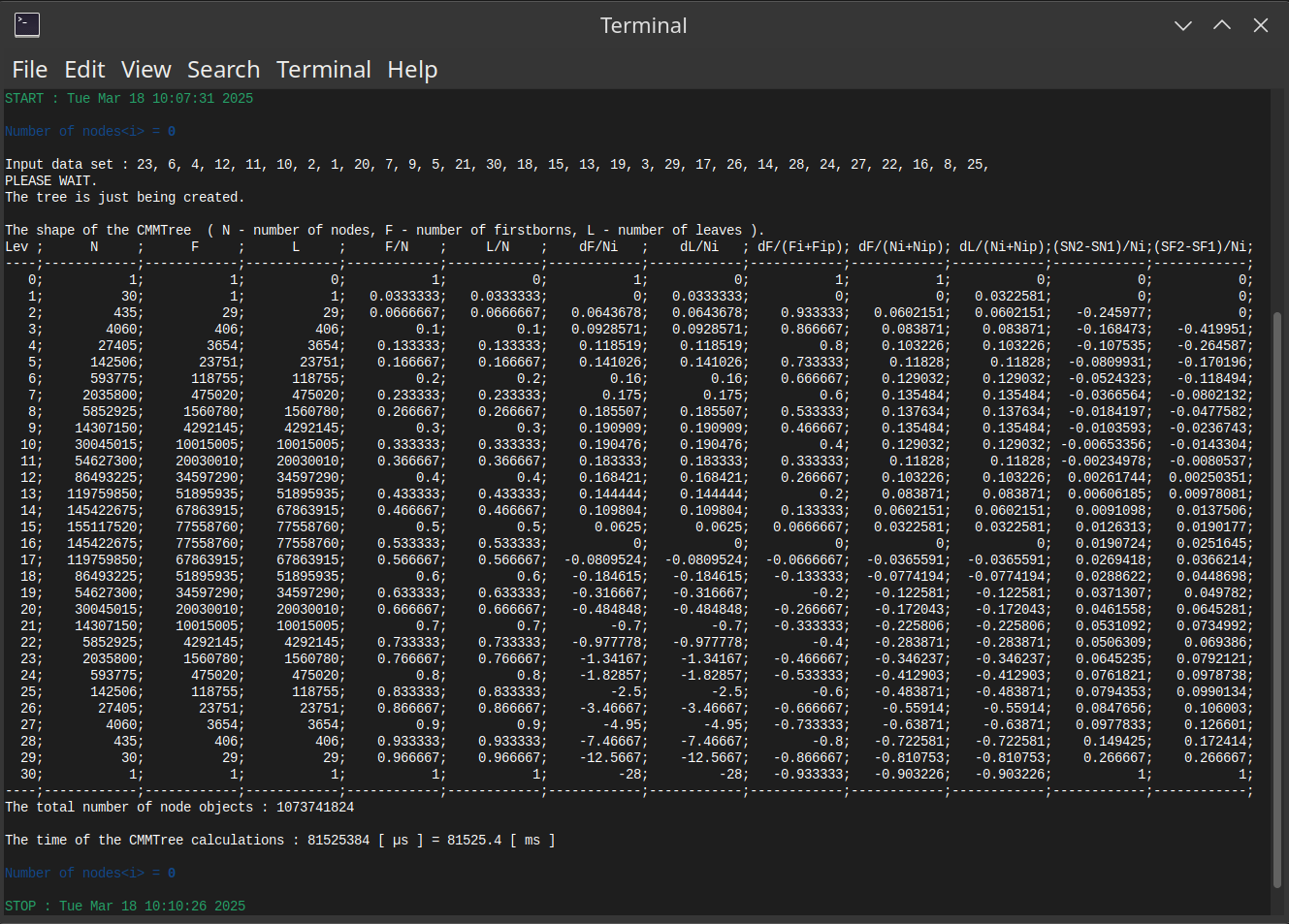
Based on the total number of nodes, the number of firstborn nodes and the number of leaves of each level of the tree, quantitative and qualitative measures are calculated to determine its shape.
More information can be found in the paper:
The Conditional Multiway Mapped Tree: Modeling and Analysis of Hierarchical Data Dependencies
Before you start using this software, make sure you have it installed:
If you are using a computer with a Linux Operating System, we recommend:
For Apple computers, you only need to have the Xcode development kit installed.
If you are using Windows Operating System you need the mingw-w64 runtime environment.
We used the MSYS2 environment, which offers both compilers and the Make program.
The list of compilers we used to test our software can be found here.
All you need to work with CMMTree is a simple text editor and an operating system shell program.
However, we recommend installing an Integrated Development Environment (IDE) such as Visual Studio Code or VSCodium.
The CMMTree is a dynamically allocated structure (on the heap), so the more RAM your computer has, the larger structures you can build and analyze.
If you are going to analyze a tree of one billion nodes you should have at least 96 GB of RAM.
Clone the project repository by running the following command:
After cloning, the basic directory structure should look like the following:
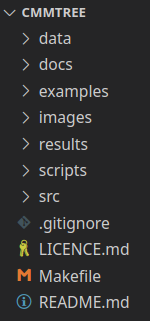
The CMMTree project directory structure.
This is the general structure of the project, which you can adapt to your needs in the future.
The key to the projects you create are the source code files located in the src directory.
In the docs/html directory (on your computer) you will find the documentation for this software.
You can also find this documentation (on line) at cmmtree.ki.pcz.pl.
We have also prepared several examples to show how the CMMTree model works and how to use it to create your own solutions.
In the scripts directory you will find several scripts that simplify the compilation of some examples. Read the brief instruction to find out when and how to use a particular script.
Before you start analyzing individual examples, we suggest you first see them in action.
scripts directory. or - if you are using Windows
This way you will also be able to check whether the compiler you are using meets the requirements we mentioned earlier.
Each example includes comments that (we hope) may be helpful in analyzing them.
It is therefore best to review the source code of the example and observe the program's output. In some examples, it is good to successively comment or uncomment certain sections and recompile and run the program again.
basic_00.hpp, basic_01.hpp and basic_02.hpp are from the “Hello World” category. They show how to define CMMTree objects and when the tree being created is a single tree and when it is a forest, i.e. a collection of trees. These examples use very simple input data types and very simple functors that determine the conditions for connecting nodes.basic_03.hpp example shows how, by defining a specialization of the tree_predicate<ToD> class, you can provide additional instructions and data that will affect the decisions to attach the next nodes. class-hierarhy subdirectory illustrates how to work with data of different types. These types can be any but must belong to a common class hierarchy. <=> ) was introduced in the C++20 standard, many codes that compiled to the C++17 standard stopped compiling (find out more). Operators == implemented as virtual functions have become a problem. compiled-class-hierarchy example, you will see how to organize your project so that some of the code that processes data can be compiled into a separate static library. CMMTree building, and how to check that the program is still "alive" and has not hung on some loop, for instance. compiled-library_ProToc directory we have included header files with definitions of the classes we use and declarations of other custom functions. The main_task() function, which integrates all protocol processing operations, is provided as a static library - compiled separately for Linux, Windows and macOS. main_task() libraries for Linux and Windows are compiled for x86-64 processors, while for macOS it is compiled for processors with ARM64 architecture. data/ProToc directory, we have included three sample protocols encoded in ProToc language allowing you to see how we detected attacks on these protocols using CMMTree.By analyzing the examples, you could see that your own data analysis program using CMMTree can be created in a few ways.
The general, rules are as follows:
functions to build and analyze CMMTree. tree_predicate<ToD> class to adapt the overloading of the function call operator to your own <ToD> data type that you will process and analyze.Use the instructions: First own project.
If you want to minimize the structure of your project, you can download the simplest, ready-made CMMTree use case.
 1.12.0